Introduction
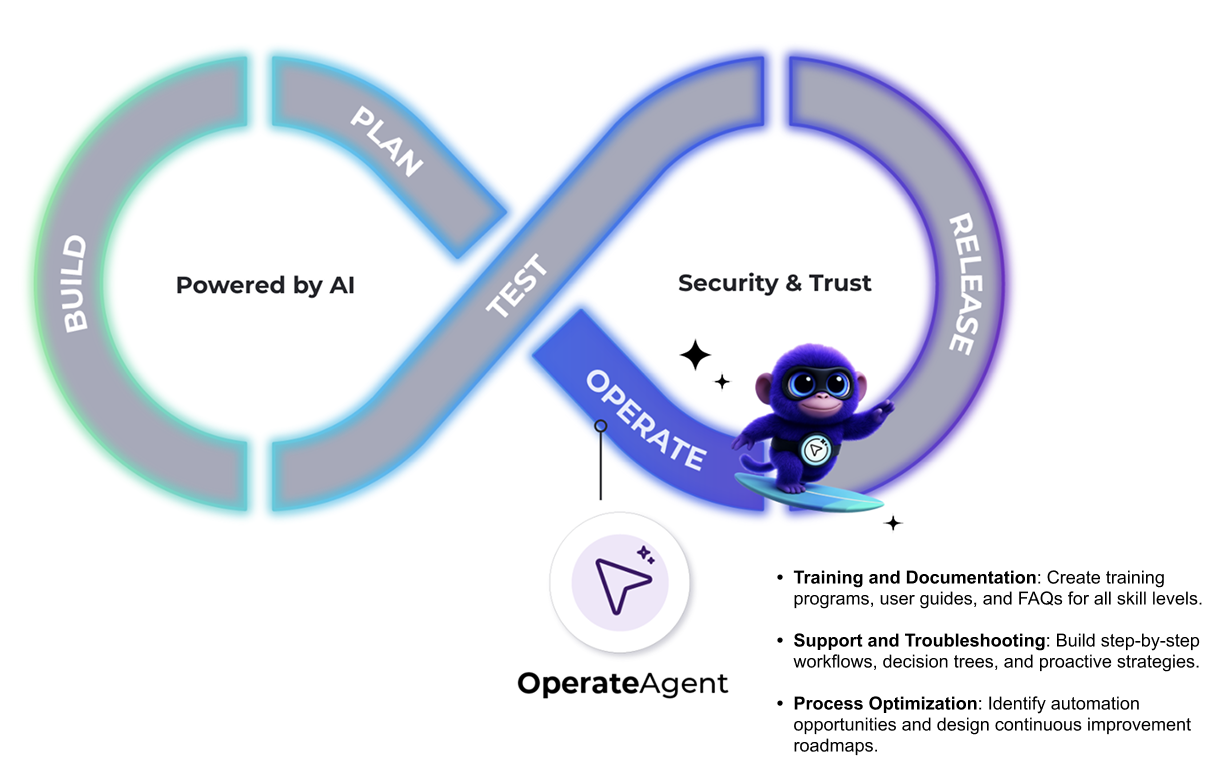
The Operate Agent is an AI-powered assistant that supports the Operate stage of the DevOps lifecycle. It helps you maintain system stability, support users, and optimize processes after releases go live.
Available interfaces: AI Context Hub
How the Operate Agent Supports Your Workflow
After a release has gone live, the Operate Agent assists you with troubleshooting, change management planning, and process optimization. The agent works within the AI Context Hub using the documentation and information available in your workspace to provide context-aware guidance.
The Operate Agent offers support across specialized areas such as Salesforce systems, enterprise applications, and business process management. It helps you create training materials, generate user documentation, design support workflows, plan for system changes, and identify opportunities for automation and continuous improvement. Through interactive assessments and collaborative problem-solving sessions, the agent provides tailored recommendations aligned with your organization's specific needs and challenges.
Capabilities
Training and Documentation
- Create customized training programs for all skill levels (beginner to advanced).
- Build assessment frameworks to measure learning effectiveness.
- Develop user guides, tutorials, and FAQ documentation.
User Support and Troubleshooting
- Provide step-by-step problem resolution guidance.
- Create troubleshooting workflows and decision trees.
- Develop proactive support strategies to prevent recurring issues.
Change Management Planning
- Design comprehensive communication strategies for system changes.
- Develop rollback procedures and risk mitigation strategies.
Process Optimization
- Identify automation opportunities for repetitive tasks.
- Design continuous improvement roadmaps.
- Create performance monitoring and reporting systems.
- Develop best practice guidelines and standards.
Specialized Focus Areas
- Salesforce Systems: Configuration guidance, customization support, and user adoption strategies.
- Enterprise Applications: Integration advice (such as CRM with ERP using middleware patterns) and workflow optimization.
- Digital Transformation: Guidance for organizations transitioning to new technologies.
Interactive Approach
- Conduct thorough current-state assessments using workspace documents.
- Engage in collaborative problem-solving sessions.
- Provide tailored recommendations tailored to the organizational context.
Acceptance and Reporting
- Produce measurable acceptance criteria for change management initiatives.
- Generate exportable deliverables such as slides and checklists.
Constraints
Technical Constraints
- System Access: Cannot directly modify or configure systems. The agent provides guidance only.
- Real-time Data: Cannot access live system data or perform real-time monitoring.
- File Execution: Cannot run scripts, execute code, or install software.
- External Integrations: Cannot directly connect to third-party systems or APIs outside the workspace.
- User Account Management: Cannot create, modify, or delete user accounts in any system.
Data and Information Boundaries
- Historical Data: Limited to information available in workspace documents and provided context.
- Confidential Information: Cannot access sensitive data not explicitly shared in the conversation.
Scope Limitations
- Direct Training Delivery: Cannot conduct live training sessions. The agent creates materials and frameworks only.
- Out-of-Scope Requests: The Operate Agent's scope is read-only. When you ask for something it cannot do, it tells you which agent to use and does not draft the content of your request. The receiving agent cannot see the conversation, so provide the request details to that agent.
The Operate Agent names the agent that handles each type of request:
- Deployment steps: Build Agent or Release Agent
- Commits, promotions, and deployments: Release Agent
- Planning records: Plan Agent
- Test jobs: Test Agent
Security and Robustness
- Does not fabricate specific facts such as API names or platform features.
- Does not leak workspace contents between sessions.
- Handles conflicts between instructions and policy constraints appropriately.
Use Cases and Sample Prompts
1. Create and Customize Training Materials
Use the Operate Agent to develop tailored training programs for your teams. The agent helps you build structured learning plans and assessments to ensure skill development and adoption across the organization.
Example prompts:
- Create a beginner-friendly training guide for our new Salesforce users covering basic navigation and lead management.
- Design a comprehensive onboarding program for our customer service team using our CRM system.
- Develop an assessment framework to measure learning effectiveness for our Salesforce training program.
2. Generate User-Facing Documentation
Use the Operate Agent to create clear, comprehensive documentation for your users. The agent helps you produce support materials that reduce confusion and improve user self-sufficiency.
Example prompts:
- Create guidelines for maintaining data quality standards across our applications.
- Design an FAQ section for our internal help desk covering the most frequent software questions.
- Develop best practices documentation for our Salesforce configuration.
3. Design Support and Troubleshooting Flows
Ask the Operate Agent to help you define structured support procedures. It generates step-by-step troubleshooting workflows, decision trees, and proactive strategies to guide your team through issue resolution.
Example prompts:
- Our users are struggling with data entry errors in Salesforce. Provide a systematic troubleshooting approach.
- Create a decision tree for resolving common integration issues between our CRM and ERP systems.
- Design a proactive support strategy to prevent recurring issues with our workflow automation.
4. Plan and Support Change Management
Use the Operate Agent to prepare your organization for upcoming changes. It helps you build communication strategies, rollback procedures, and risk mitigation plans to ensure smooth transitions.
Example prompts:
- Design a communication plan for rolling out Salesforce Lightning to our sales team.
- Develop a user adoption strategy for our new customer portal launch.
- Create rollback procedures and risk mitigation strategies for our upcoming system upgrade.
5. Recommend Process Improvements and Automation
Use the Operate Agent to identify inefficiencies in your current workflows and suggest opportunities for automation. The agent helps you analyze existing processes and outline continuous improvement plans.
Example prompts:
- Analyze our current lead qualification process and recommend automation opportunities.
- Identify bottlenecks in our customer onboarding workflow and suggest optimizations.
- Design a continuous improvement framework for our Salesforce configuration.
- Create a 6-month roadmap for improving user adoption across our enterprise applications.
6. Document and Promote Best Practices
Ask the Operate Agent to help you capture and share industry best practices and operational standards. It supports teams working with Salesforce or enterprise applications by documenting proven methods and guidelines.
Example prompts:
- Create performance benchmarks for our customer service response times.
- Document integration best practices for connecting our CRM with ERP systems using middleware.
- Develop standards for our digital transformation initiative.
7. Provide Tailored Recommendations Based on Context
Use the OperateAgent to assess your current state and get context-aware recommendations. By leveraging the documentation and information available in your workspace, the agent offers guidance aligned with your organization's specific needs and challenges.
Example prompts:
- Assess our current Salesforce configuration and recommend improvements based on our workspace documentation.
- Review our support workflows and suggest optimizations tailored to our organization.
- Analyze our change management approach and provide recommendations for our upcoming system migration.
Next Steps
Get started with the AI Context Hub and use one of the prompts to ask the Operate Agent to help you automate your workflows or generate customer-facing documentation.